Capture feedback at restaurant checkout
Capture guest feedback at the restaurant bill and payment handoff without a public touchscreen, QR code or typed survey, then review checkout patterns.
Read the guideThumbsUp gives dine-in and counter-service restaurants a touchless way to invite a short rating after a defined service moment. A guest faces a compatible camera-equipped Android tablet, gives a hand gesture, and authorized managers review the signal by configured location, device and time.
This page covers seated and counter-service experiences. Drive-through vehicle handoffs have different safety and placement requirements and belong on the drive-through workflow page.
Choose a service point for restaurants
Host stand, counter, table-service exit, or restroom approach
Invite an optional service gesture
Supported gesture at the camera.
Review the restaurants signal
Daypart and service-point context for the restaurant team
Set one short service question.
More industry guides
Compare related service moments.
Capture guest feedback at the restaurant bill and payment handoff without a public touchscreen, QR code or typed survey, then review checkout patterns.
Read the guideGive restaurant managers an in-visit feedback signal for service recovery, with time, day, device and location context for practical follow-up.
Read the guideCapture in-visit feedback on greeting, pacing, food handoff and service at the table with ThumbsUp's touchless camera-tablet workflow.
Read the guideWhy restaurant feedback needs a service moment
A rating is most useful when the team knows what moment the guest just completed. Keep the prompt away from a busy table conversation, invite it voluntarily, and use the result to decide what the floor manager should investigate.
Greeting, ordering, table service, counter handoff, cleanliness and checkout create different signals. Do not treat one gesture as a food-quality diagnosis.
Noise, lighting, queues, tables and occupied hands change by daypart. A fixed point must be visible without interrupting guests or staff.
A point-of-service signal can prompt a manager conversation. It should not gate, suppress or replace a guest’s independent public review choice.
A guest-to-manager feedback sequence
Restaurant teams can make the feedback moment clear by choosing one handoff, one device label and one manager question. Start where the guest can pause without blocking the floor.
Pick host stand, counter handoff, meal completion or exit, and state whether the guest is rating service, the area or the handoff.
Offer a supported gesture at the camera. Keep another channel available for guests who need it.
Use location and time context to compare a service point fairly, while recognizing that menu, volume and staffing can change the experience.
Authorized managers review the signal and check ticket-time, queue, cleanliness or staffing observations before choosing a response.
Deployment check: Test placement for restaurants.
From guest signal to floor review
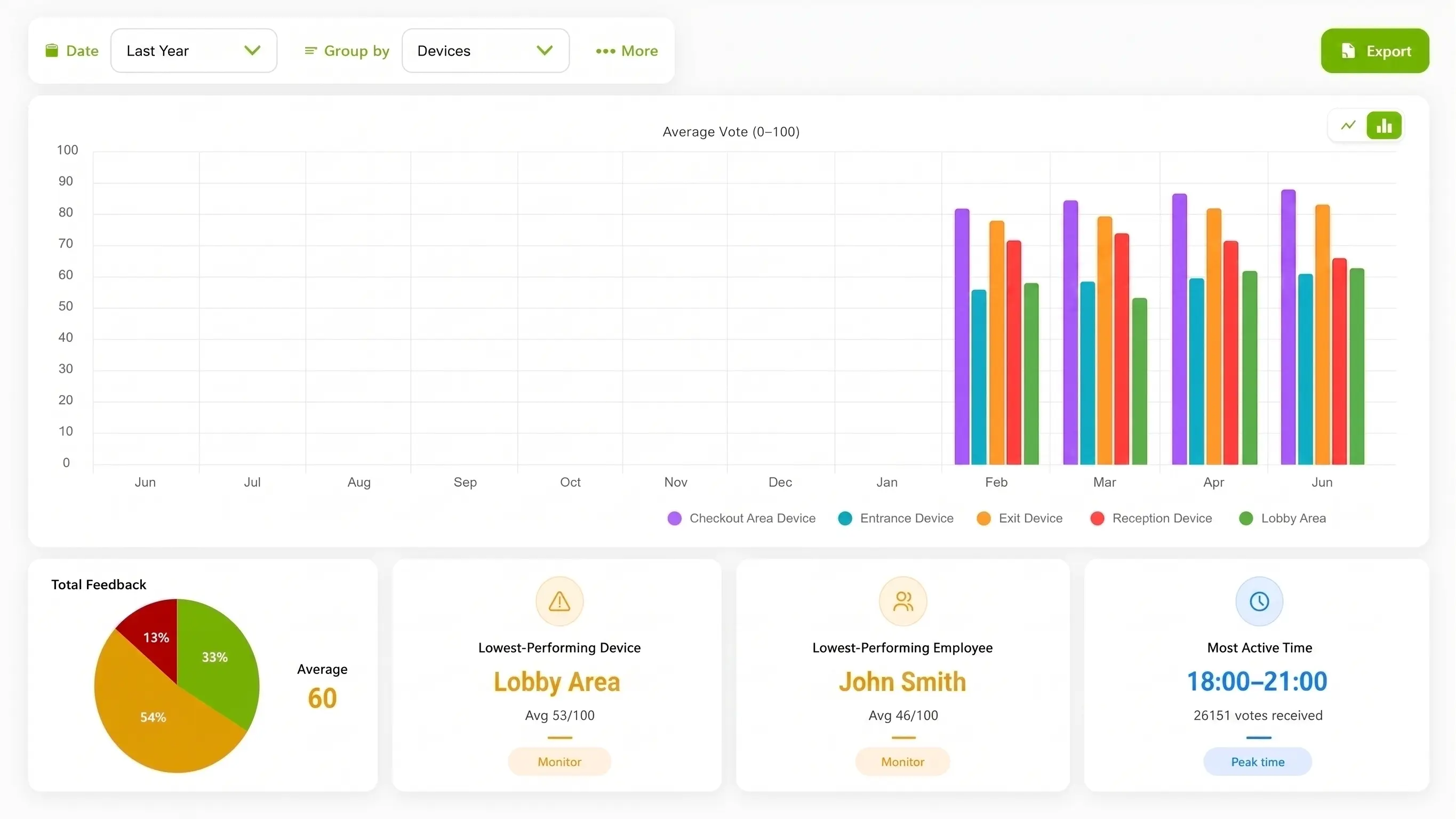
ThumbsUp can show where and when a service signal changes. The restaurant still needs its own operating records and conversations to understand why, whether the issue concerns speed, hospitality, cleanliness or another part of the visit.
Compare configured breakfast, lunch, dinner or other periods to see when a service point deserves a review.
Separate a counter, host stand, exit or another defined point so the manager knows which journey to observe.
A pattern may focus a review of ticket times, floor coverage or handoff practice. It does not assign fault or measure food quality automatically.
Hypothetical operator example
Hypothetically, the evening signal at one restaurant falls during a configured time block. The manager checks ticket-time and floor observations before changing a process. The gesture alone does not prove that food, a server or one shift caused the dip.
Guest-flow placement
A restaurant can choose a point that fits its layout and pace. Keep the interaction outside private guest conversations and show a clear route around the device.
Invite a rating after a completed counter order, with the device outside the pickup queue and away from hot food or staff reach zones.
Give dine-in guests a chance to pause after the meal or checkout, without making a table interaction part of the prompt.
Test a visible point near a completed service area, while keeping restrooms, private conversations and accessibility paths clear.
Useful evidence for a rollout: A permissioned counter or exit photograph, a guest-flow diagram that marks the service moment, and a captioned prompt-to-dashboard video can help a restaurant team evaluate fit. Staged setups should be identified clearly, with guests, receipts, payment details and staff names kept out of the frame.
Compare interaction options for restaurants
QR, receipt, SMS and physical inputs each have a place. Choose based on whether the guest can pause and how much detail the manager needs.
| Consideration | ThumbsUp | QR survey | Physical-button terminal |
|---|---|---|---|
| Guest effort | A brief gesture at a fixed point after service | The guest scans, opens and completes a form on a personal device | The guest reaches shared hardware and presses a physical control |
| Best fit | A quick service signal at a counter, host stand or exit | Open text, detailed questions or later follow-up | A rugged, familiar input where camera conditions are unsuitable |
| Tradeoff | Needs tested sight line, lighting, mounting, power and a clear pause point | Adds phone steps and can be missed when guests are ready to leave | Requires a reachable shared device and maintenance process |
Product fit for restaurants
The documented ThumbsUp workflow captures a customer gesture with a compatible Android tablet and lets authorized managers review the resulting feedback by configured device, location and time. Employee-related results are available when schedules are configured.
A score is a service-experience signal; it does not measure food quality, identify a poor-performing employee, trigger a refund or control public reviews. Keep a QR or survey path for richer comments and use public review tools for the reputation job. The camera handles gesture input; feedback records contain no video; confirm current privacy requirements before launch.
Review the product specificationRestaurants can collect feedback immediately after a defined service moment such as ordering, table service, pickup or payment. ThumbsUp gives the team a quick, touchless signal to review by configured device, location and time.
Questions for the restaurants service journey
Validate local site conditions before launch.
A restaurant can test a fixed, guest-visible tablet at a counter, host stand, service-area boundary or exit. After the defined service moment, the guest faces the camera and gives a supported hand gesture. The site still needs a suitable pause point and an alternative channel.
It is a camera-equipped tablet that invites a brief hand gesture rather than a typed form or shared touchscreen. ThumbsUp records a feedback signal for authorized managers to review with configured device, location and time context.
Managers can compare configured feedback by time, location and device, with employee-related results when schedules are configured. Use the pattern with ticket-time, staffing and floor observations to choose a fair service or process improvement.
A private point-of-service signal can help a manager hear customer feedback while the experience is fresh, and a guest remains free to use a public review or another feedback channel. ThumbsUp should keep every review path clear and independent.
Before an industry pilot for restaurants
Check local constraints before choosing the interaction.
Can a guest pause without blocking a table, counter or exit queue?
Which moment is being rated: handoff, service, cleanliness or the room?
How will staff avoid prompting or influencing a guest gesture?
What alternative path serves guests who cannot or do not want to gesture?
How does this page stay distinct from a drive-through vehicle handoff?
Which real restaurant setup and dashboard view are approved for media?
Use adjacent guides when the scope changes.
Bring the floor plan, service moment, daypart question and reporting owner. A focused test can show whether a touchless guest signal fits before a broader rollout.
Plan a restaurant feedback pilot