Give building occupants a simple way to rate shared services
Collect a low-friction signal from occupants about shared building services, amenities and wayfinding.
Read the guideThumbsUp gives facilities teams a touchless way to collect a subjective service signal at an approved public point, such as a washroom exit or shared-area corridor. Review area and time patterns alongside inspections and work-order records.
A facilities installation must protect privacy, keep the camera field of view outside sensitive areas, preserve accessible routes, and define how supervisors will investigate a low score.
Choose an approved public point
Invite a voluntary gesture
Confirm the response for facilities and washrooms
Set one short service question.
More industry guides
Compare related service moments.
Collect a low-friction signal from occupants about shared building services, amenities and wayfinding.
Read the guideHelp facilities providers review occupant signals against contracted service rounds and site context.
Read the guideStandardize touchless feedback points across managed buildings and compare locations with consistent definitions.
Read the guideA service pulse for managed spaces
Facilities teams need a visitor’s perspective and an operational record. A touchless rating can show where a shared-space experience deserves attention, while inspections, sensors, and work orders provide the diagnostic and action systems.
The result is a visitor or occupant signal about a service moment. It does not objectively measure cleanliness, supplies, odor, or a maintenance fault.
Map each device to a shared area and the supervisor or contractor responsible for investigating the context.
Compare periods alongside cleaning schedules, inspection notes, queue conditions, and supply checks. Do not imply automatic dispatch.
Privacy-conscious placement
Use an exterior corridor, lobby, or other approved public point with a clear field of view and an accessible alternative. A facilities pilot should be reviewed by the site owner and the people responsible for privacy and maintenance.
Place a compatible camera-equipped tablet outside a sensitive area, where visitors can see the prompt and move freely.
A visitor gives a supported gesture instead of pressing a shared button, typing, or scanning a code.
For facilities and washrooms, the confirmation display is configured to show for 1 second by default, according to current product documentation.
Authorized managers compare configured devices and periods, then inspect the service records behind a pattern.
Area map
Workplace, campus, transport, and public-building examples can share this page when the measured moment is occupant-rated service quality. Keep the area label and escalation path specific.
The camera field of view must stay outside sensitive spaces. Use an illustrative placement diagram only when it is labeled as such, and validate the real mounting position with the site’s privacy and accessibility owners.
Place the device outside the washroom entrance or exit with no view into private areas. The signal represents a visitor impression after using the space.
Use a public point for a building or visitor experience. Keep the device clear of queues, security work, and accessible travel paths.
Label the service area and decide whether visitors are rating cleaning, seating, food service, or the broader common-space experience.
Treat each zone as a separate pilot when lighting, flow, ownership, and privacy conditions differ. Do not imply a whole-site score explains every area.
From rating to inspection
An area and time pattern can help a supervisor choose which cleaning round, supply check, queue condition, or contractor conversation to review. The feedback does not create a work order or confirm a fault by itself.
Hypothetical facilities example
Ratings outside a shared washroom fall before an evening cleaning round. The supervisor checks supplies and queue conditions using existing records. The example does not claim an automatic dispatch or objective cleanliness measurement.
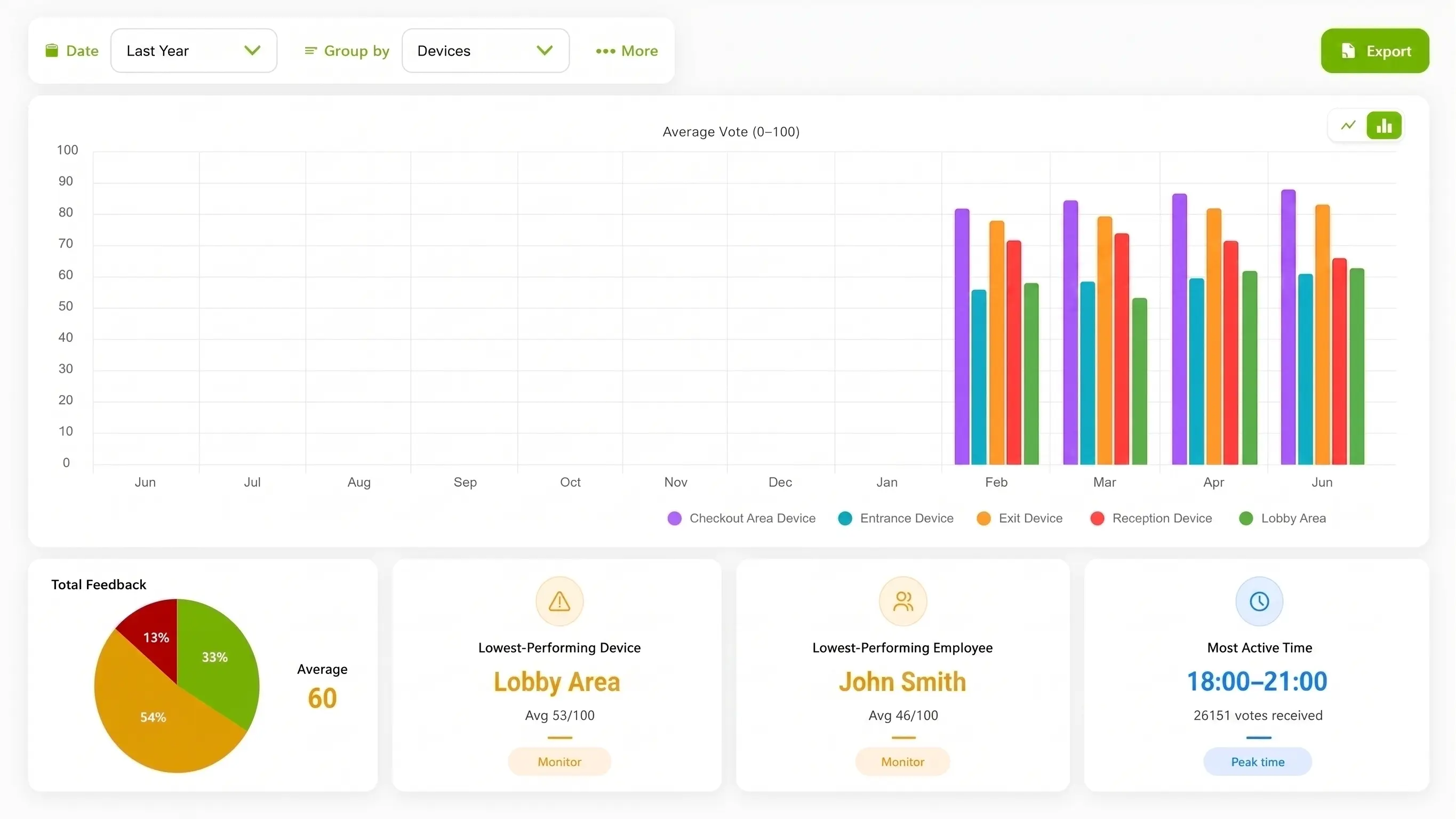
Use the dashboard to review configured area and time trends. The product interface image is illustrative and does not show a facilities inspection, sensor reading, or work-order integration.
Systems with different jobs
A short experience signal can complement a facilities workflow when the roles are explicit. Keep the evidence and ownership paths clear for supervisors, contractors, and visitors.
| Consideration | ThumbsUp | QR or SMS survey | Existing service process |
|---|---|---|---|
| Customer action | Give a supported gesture at an approved public point | Press a shared button or complete a phone survey | Report an issue through reception or a service channel |
| Best fit | A brief occupant or visitor experience signal by area and time | A different physical or detailed response flow | A request that needs a person, inspection, or work order |
| Operational view | Configured device, area, and time context | The fields and reporting in the chosen channel | Inspection, contractor, sensor, and work-order records |
| Important boundary | Not a cleanliness sensor, dispatch engine, or CAFM replacement | May not protect the same privacy or accessibility needs | May not provide comparable voluntary feedback across spaces |
Facilities pilot checklist
A credible pilot identifies the public interaction point, the responsible supervisor, the records used in investigation, and the alternative channel for visitors who cannot or do not want to use a gesture.
Review the field of view, accessibility, lighting, cleaning products, and vandalism risk.
Keep the device outside private areas and document the approved mounting location.
Map each device to a shared area and the supervisor or contractor who reviews it.
Define how scores relate to inspections, cleaning rounds, work orders, and complaints.
Privacy and data boundary
For facilities and washrooms, current ThumbsUp documentation says the selfie camera supplies live input for hand-gesture recognition, does not collect biometric data, and that ordinary feedback records do not contain a camera image or video. Review the current Privacy Policy, retention behavior, signage, accessibility plan, and site security requirements before deployment.
Read the Privacy PolicyOperational questions for facilities and washrooms
Match setup to the service moment.
A facilities team can test a compatible camera-equipped Android tablet at an approved public point outside the restroom, such as an exit corridor. A visitor gives a supported gesture, and managers review the area and time signal alongside inspections and cleaning records.
No. It captures a subjective visitor or occupant experience signal. Cleaning inspections, supply checks, sensors, and work orders remain separate sources for diagnosing and correcting a facilities issue.
No. ThumbsUp can help a supervisor decide which area or period to investigate, but it does not replace a cleaning workflow, work-order system, inspection record, or contractor process.
Use a visible, stationary, accessible point outside sensitive areas, with a field of view that does not include private spaces. Validate the exact distance, angle, lighting, traffic, and privacy requirements at the site.
More facilities and washrooms service moments
Bring your area map, privacy requirements, cleaning records, and service ownership questions. We can review a public, privacy-conscious placement and the evidence needed for a useful pilot.
Talk through the facilities setup