Capture hotel breakfast service feedback while the experience is fresh
Measure hotel breakfast flow, service and dining-area experience with a focused feedback point guests can use as they leave.
Read the guideThumbsUp gives hotel and resort teams a touchless way to invite a short service rating at a visible on-property touchpoint. A guest faces a compatible camera-equipped Android tablet, gives a hand gesture, and authorized managers review the signal by configured device, location, and time.
This is an in-stay operational pulse. It needs a guest-visible point, a clear free-hand interaction, suitable lighting, and an alternative channel for guests who cannot or do not want to gesture.
Choose a service point for hotels and resorts
Reception, breakfast, spa, or checkout
Invite an optional service gesture
Supported gesture at the camera.
Review the hotels and resorts signal
Location and time context for the guest-experience team
Set one short service question.
More industry guides
Compare related service moments.
Measure hotel breakfast flow, service and dining-area experience with a focused feedback point guests can use as they leave.
Read the guideCreate a focused hotel checkout feedback point for billing clarity, wait experience and the final service moment.
Read the guidePlan a useful hotel front-desk feedback point at arrival and turn check-in patterns into practical service investigations.
Read the guideCompare hotel guest-service patterns by touchpoint, time and location so managers can choose focused operational investigations.
Read the guideWhy hospitality needs its own workflow
A post-stay survey can ask for detail later, while a fixed on-property point can capture a short signal while the team can still investigate the moment. The placement and question must fit the guest journey rather than interrupt it.
Reception, concierge, breakfast, spa, pool, housekeeping and checkout create different service moments. A device label should make the moment being rated clear.
Luggage, children, room keys and mobility needs affect where a guest can pause. Choose a point with room to stand and a clear way to use an alternative channel.
A lower breakfast-area score may prompt a review of queues, replenishment or staffing. It does not identify a room, booking, employee or cause on its own.
An in-stay feedback sequence
The property team can design a point that feels like a helpful invitation rather than a survey desk. The prompt, device label and response owner should be agreed before a pilot.
Start with reception, breakfast, spa, pool exit or checkout, and decide whether the signal concerns the completed service or the common area around it.
Test mounting, sight line, lighting, queue space and language-neutral prompting with the property team and an accessibility alternative.
Offer a supported hand gesture. Keep participation voluntary and provide a private alternative.
Authorized managers review the configured device, location and time context, then use property records and conversations to decide what to inspect.
Deployment check: Test placement for hotels and resorts.
From guest signal to property action
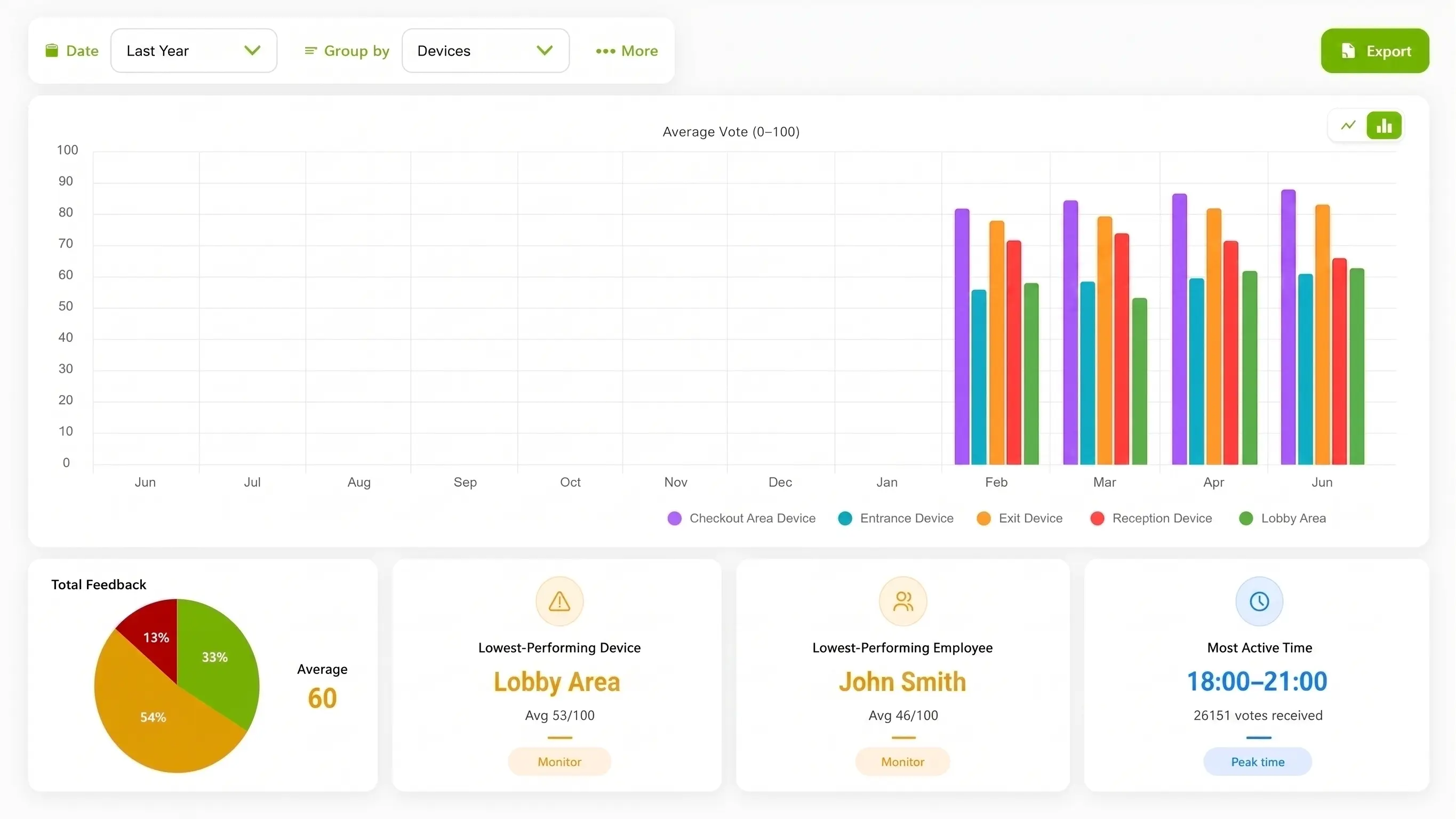
ThumbsUp can help a property compare signals from mapped touchpoints. The dashboard is a starting point for an investigation, not a replacement for a PMS, review-management platform, detailed survey or service-recovery conversation.
Compare configured time windows such as breakfast or checkout to see when a service point deserves a closer look.
Use device and location labels to distinguish reception, a breakfast entrance, a spa desk or a resort facility.
A score can focus a manager on queues, cleanliness, signage or staffing records without turning a simple gesture into a diagnosis.
Hypothetical operator example
Hypothetically, the team sees a lower signal from a breakfast-area device during a weekend period. It checks queue observations, replenishment notes and staffing records before deciding what to test. No room number, booking, PMS record or housekeeping outcome is inferred from the gesture.
Property touchpoint planning
Keep the prompt outside private conversations and make the service area legible. A property can test one touchpoint first, then compare other areas only when their labels and guest journeys are meaningfully different.
Place the point after a completed arrival or information interaction, away from a private conversation and the active queue.
Invite a rating after the guest leaves the service area, with enough space for a pause and a clear route around the device.
Use a visible handoff point before departure while keeping luggage, mobility aids and alternative feedback paths in mind.
Useful evidence for a rollout: A permissioned lobby or service-point photograph, a property touchpoint map, and a captioned demonstration of the guest-facing prompt and dashboard trend can help a hotel team evaluate fit. Any staged room or mock property should be identified clearly, and media should never imply a deployment that has not occurred.
Compare interaction options for hotels and resorts
Each method answers a different hospitality question. Compare the effort and depth against the service moment you want to understand.
| Consideration | ThumbsUp | QR survey | Physical-button terminal |
|---|---|---|---|
| Guest effort | A brief gesture at a fixed point after a service moment | A guest uses a personal phone and completes the requested fields | A guest reaches a shared terminal and uses a physical control |
| Best fit | A simple in-stay pulse at reception, breakfast, spa or checkout | Post-stay detail, comments or a known guest relationship | A rugged, familiar rating point where a camera interaction is unsuitable |
| Tradeoff | Needs power, connectivity, mounting and tested guest-facing conditions | Adds steps and relies on the guest having a suitable device | Requires shared hardware and a reachable installation point |
Product fit for hotels and resorts
The documented ThumbsUp workflow is a customer-facing gesture captured by a compatible Android tablet and reviewed by authorized managers in the connected dashboard. The current product evidence supports feedback by device, location and time, with employee-related results when schedules are configured.
Do not present a pilot as a PMS, booking, room-number, housekeeping or public-review integration. Use a post-stay survey, review platform or direct service-recovery process when the property needs richer follow-up. The current documentation also says the selfie camera supplies live input for gesture recognition, does not collect biometric data, and ordinary feedback records do not contain a camera image or video; confirm the current privacy terms for the deployment.
Review the product specificationHotel teams can use ThumbsUp at a defined in-stay service moment such as reception, breakfast, spa or checkout. Managers review the resulting signal by configured device, location and time alongside their normal property operations.
Questions for the hotels and resorts service journey
Validate local site conditions before launch.
A hotel can test a fixed, guest-visible point with a compatible camera-equipped Android tablet. The guest faces the camera and gives a supported hand gesture, and authorized managers review the resulting signal by the configured device, location and time. The point needs suitable mounting, lighting, space and an alternative channel.
Place it after a defined service moment such as reception, breakfast, spa or checkout, outside private conversations and away from moving queues. The correct height, angle, distance, lighting and accessibility path depend on the property and must be tested on site.
Managers can compare configured feedback by device, location and time to find a pattern worth investigating. A lower signal does not prove that housekeeping, a guest room, a team member or a specific cause is responsible; property observations and operating records provide that context.
No. ThumbsUp is a point-in-stay feedback workflow. A PMS, detailed survey, service-recovery process and public review platform serve different jobs and may remain part of a property’s guest-experience program.
Before an industry pilot for hotels and resorts
Check local constraints before choosing the interaction.
Can guests pause without blocking reception, breakfast or checkout traffic?
Where can luggage, mobility aids and an alternative feedback path fit?
Which property-area label and manager own the follow-up?
What does the property require for language, privacy and camera review?
Which guest-experience system remains the source for detailed follow-up?
Which real property photograph or demonstration has permission to be published?
Use adjacent guides when the scope changes.
Bring the property map, service moments, privacy questions and reporting owner. A focused pilot can test whether a guest-visible gesture point fits before a wider rollout.
Plan a hotel feedback pilot