Turn the order handoff into a clear operational question.
Use a touchless signal after drive-through order handoff to examine clarity and courtesy without replacing order records or complaint handling.
Read the guideThumbsUp gives quick-service and drive-through restaurants a touchless way to invite feedback at the point of service. A customer gives a gesture to a camera-equipped Android tablet, and authorized managers review the result in the dashboard.
A drive-through deployment should be tested for camera visibility, lighting, distance, traffic flow, and safe customer interaction before it is put into regular use.
Vehicle reaches the safe point
After pickup or at the exit lane
Customer gives a gesture
No shared screen, scan, or typing
Manager sees the signal
Time, device, location, and trends
Set one short service question.
More industry guides
Compare related service moments.
Use a touchless signal after drive-through order handoff to examine clarity and courtesy without replacing order records or complaint handling.
Read the guidePlan a drive-through daypart feedback pilot using time, device, and location context to find operational questions worth investigating.
Read the guidePlan feedback after drive-through pickup with safe tablet placement, customer prompts, and manager review steps from ThumbsUp.
Read the guideCompare QR surveys with touchless gesture feedback for drive-through restaurants by effort, detail, placement, and follow-up needs.
Read the guideWhy this environment needs its own workflow
The feedback method has to fit the lane, the vehicle, and the handoff. A form that works at a desk may be inconvenient when a customer is holding a steering wheel, collecting an order, or keeping traffic moving.
Customers may be steering, receiving food, or preparing to leave. A one-gesture interaction gives them a simpler option than a typed survey.
If an experience goes wrong, a customer may leave without telling the team. A visible feedback point creates an opportunity to hear that signal before the visit is over.
Order accuracy, wait time, staffing, and equipment issues can vary by daypart, shift, lane, or location. The dashboard gives managers context for an investigation.
A practical deployment sequence
The tablet is one touchpoint in an operating process. The placement, prompt, dashboard labels, and manager response should be designed together.
Place a compatible camera-equipped Android tablet where a customer can see it after service, such as a pickup window or exit lane. The exact mounting position needs an on-site test.
The customer sees the prompt and gives a supported hand gesture. No typing, QR scan, app download, account, or shared touchscreen is required.
The approval confirmation is configured to show for 1 second by default. Feedback and display settings can be adjusted during a deployment pilot.
Authorized managers can review feedback by device, location, time period, and employee-related results when schedules are configured.
Safety and evidence note: The correct distance, angle, lighting, and customer position are deployment-specific. Validate a real pilot at the intended lane before making a speed, reach, or response-rate claim.
From gesture to operating context
A score is most useful when a team can place it in time and location context. ThumbsUp helps authorized users review trends and decide which part of the service journey needs attention.
Compare breakfast, lunch, evening, or other configured periods to see when scores change and decide what to investigate.
Use device and location labels to compare branches, lanes, pickup points, or other defined feedback locations.
When employee schedules are configured, employee-related results can help managers decide where a service review is needed.
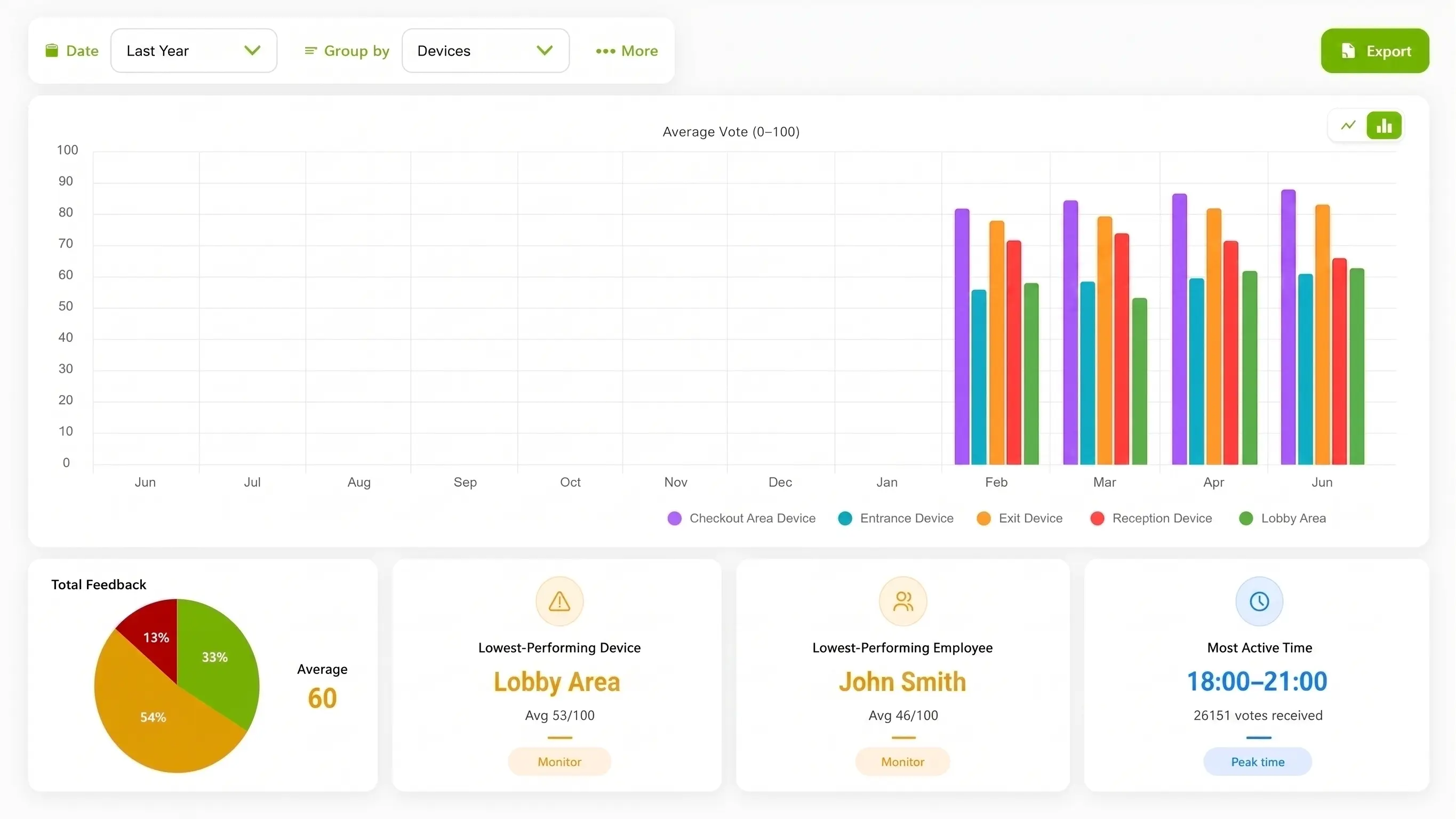
Use the dashboard to compare the configured feedback devices and review historical trends. The example above is product interface imagery, not a drive-through customer result.
Compare feedback options at the lane
QR surveys and touchscreen kiosks can be useful in the right setting. The drive-through question is whether the customer can realistically use the method at the moment service ends.
| Consideration | ThumbsUp | QR survey | Touchscreen kiosk |
|---|---|---|---|
| Customer action | Show a hand gesture | Scan, open, and complete a form | Touch buttons or a screen |
| Vehicle-friendly setup | Can be designed around a vehicle touchpoint; validate distance and sight lines on site | Requires a phone and attention to a QR code | Requires a customer to reach a shared device |
| Operational view | Score with time, device, location, and configured employee context | Depends on the survey fields and reporting setup | Depends on the kiosk software and reporting setup |
Installation planning
A pilot should map the customer path, identify a safe interaction point, and test the tablet with the real lighting and distance of the site.
Pickup window or handoff point
Exit lane after the customer receives the order
A pedestrian pickup area that serves drive-through orders
Documented privacy language
The current ThumbsUp documentation says the selfie camera supplies live input for hand-gesture recognition, ThumbsUp does not collect biometric data, and ordinary feedback records do not contain a camera image or video. Confirm the current Privacy Policy, retention behavior, and site requirements before deployment.
Read the Privacy PolicyDrive-through operator questions
The right setup depends on the site, hardware, customer position, and operating process.
A drive-through can place a compatible camera-equipped Android tablet at a safe point after service. A customer gives a supported hand gesture, and the resulting score is sent to the connected ThumbsUp Dashboard with operational metadata.
A site can be designed so a customer gives a gesture from the vehicle, but the correct camera distance, angle, lighting, and mounting position depend on the location and hardware. Test the complete setup before launch, and never ask a driver to interact while the vehicle is moving.
ThumbsUp is a different interaction model: the customer gives a gesture to a camera-equipped tablet instead of scanning a code, typing into a phone, or touching a shared screen. The right option depends on the service flow, installation, and reporting requirements.
Managers can compare feedback by time, device, and location. When employee schedules are configured, the dashboard can also show employee-related results, helping the team choose a focused shift or service review.
ThumbsUp documentation says the selfie camera supplies live input for hand-gesture recognition, does not collect biometric data, and that ordinary feedback records do not contain a camera image or video. Review the current Privacy Policy and deployment requirements for your organization.
Bring your lane layout, customer handoff, and reporting questions. We can review where a touchless gesture point may fit and what should be validated before launch.
Talk through the setup