Place feedback after pickup without creating another queue
Plan a touchless feedback point after café pickup without blocking the queue. Compare counter, shelf and exit placement checks with ThumbsUp.
Read the guideThumbsUp gives cafés, bakeries, and takeaway counters a brief touchless way to invite feedback after a drink, bag, or order handoff. The page is built around the counter moment, where a customer may have a full hand and a queue may be moving.
For café owners, chain operations, and bakery or food-counter managers
Choose a spot where a customer can pause safely and keep the tablet away from spills, queue pinch points, and moving staff.
After the order is ready
Customer receives the drink or bag
Step 1 for the counter handoff workflow
A clear pause point invites a gesture
Step 2 for the counter handoff workflow
Owner reviews rush and branch context
Step 3 for the counter handoff workflow
Set one short service question.
More industry guides
Compare related service moments.
Plan a touchless feedback point after café pickup without blocking the queue. Compare counter, shelf and exit placement checks with ThumbsUp.
Read the guideClose the café pickup feedback loop on missing items and incorrect customizations. Use ThumbsUp as a handoff signal alongside tickets, remake logs and manager checks.
Read the guideUse a short café feedback signal to focus morning-rush reviews. Compare daypart, branch and counter context without treating feedback as an automatic queue-time metric.
Read the guideWhy cafés need a counter-specific workflow
The prompt belongs after the handoff, before the customer disappears into the street or seating area. The setup should fit the queue, the counter footprint, the drink or bag, and the daypart being measured.
A customer with a drink, bag, or phone needs a simple interaction with a visible pause point instead of a long form.
Morning queues, lunch takeaway, and quieter afternoon service can feel different. Compare like periods before deciding what changed.
A tablet must stay clear of spills, pickup shelves, payment equipment, and the path staff use to complete orders.
A counter-handoff sequence
A café pilot should design the handoff, prompt, and manager review together so feedback does not become another obstruction at the counter.
Test the end of the counter, pickup shelf, or takeaway exit where the order is complete and the customer can pause.
Keep the prompt visible without narrowing the queue or asking a customer to handle a device with a full hand.
Offer one supported gesture after service. Let customers continue when they are ready.
Review configured location and time context, then check queue length and staffing observations.
Deployment note: Test the device with drinks, bags, coats, children, and normal queue movement. A customer should be able to pause voluntarily, with a clear alternative when the moment is too busy.
Placement planning
There is no universal counter position. A few inches can change reach, spill exposure, visibility, and whether a customer blocks the next order.
From counter signal to owner action
ThumbsUp helps an authorized owner review the configured device, branch, and time context. The owner then checks the physical workflow behind the pattern.
Compare defined rush periods to see where queue pressure or order handoff deserves a closer look.
Use device and location labels to compare cafés or counters with similar service questions.
Check queue length, staffing, pickup shelf clarity, and order communication before changing the flow.
Illustrative morning-rush check
If one branch’s morning scores fall, the owner checks queue length, bar coverage, and pickup-shelf communication. The score is a prompt for that review, not proof of a single cause.
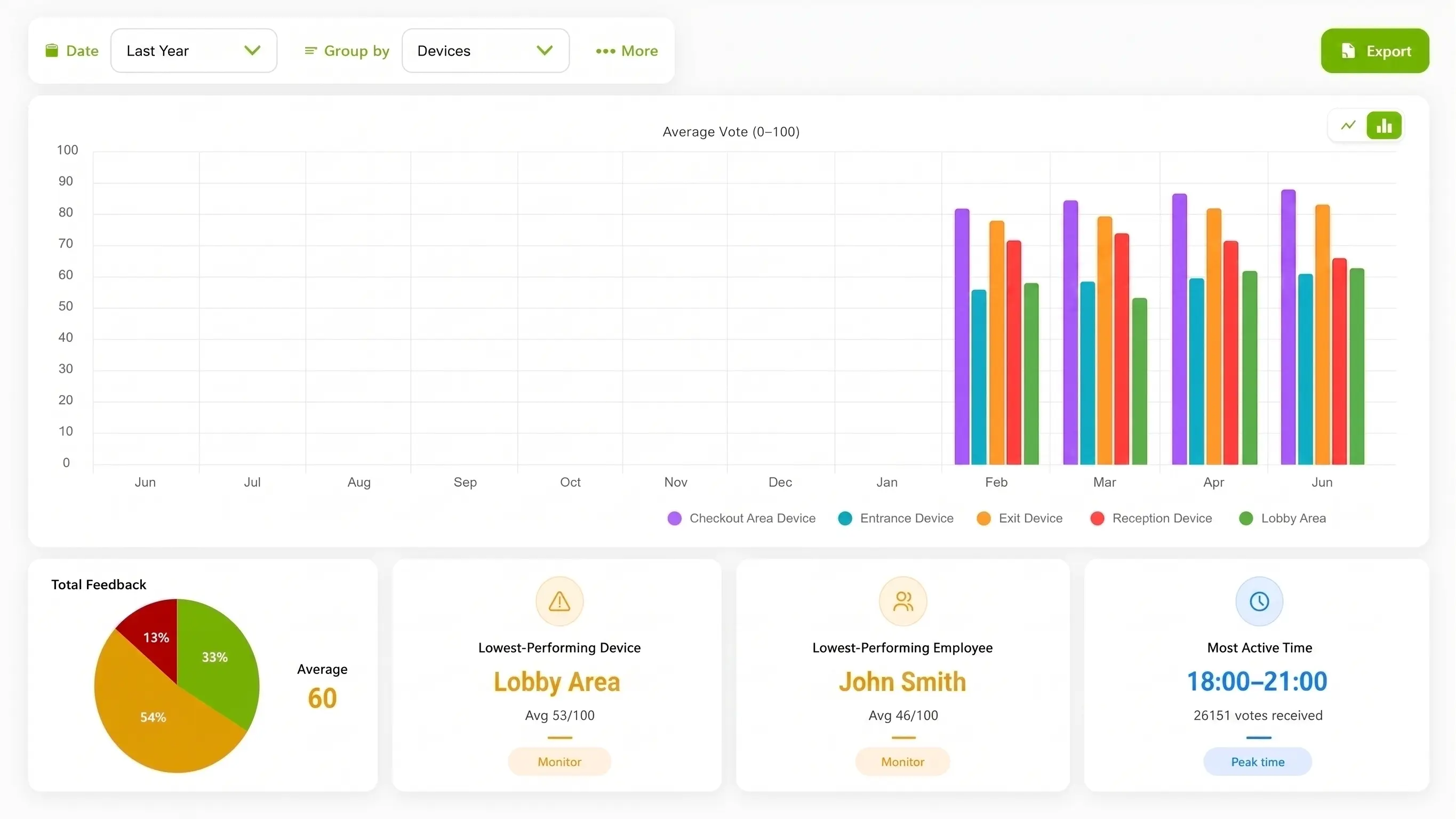
Illustration of configured review.
Choose the method for a quick counter visit
A receipt QR code or loyalty follow-up may collect richer detail later. The counter question is whether a customer can offer a voluntary signal before leaving with the order.
| Consideration | ThumbsUp | QR or phone survey | Shared kiosk |
|---|---|---|---|
| Customer action | Give a brief gesture at a clear counter pause point. | Scan a receipt code and complete a phone form later. | Use a shared touch display near the counter. |
| Setup question | Check camera view, distance, light, and pause. | Open the code and complete the form. | Reach the shared screen at the moment. |
| Manager view | Review device, location, time, and context. | Review fields from the survey workflow. | Review fields from the kiosk workflow. |
Evidence for rollout planning
A permissioned café setup photo or clearly identified diagram can help a team evaluate the counter exit. A short captioned handoff demonstration should show the tablet at the counter exit and a stationary customer, with spill, queue, and full-hands conditions described clearly.
Practical pilot boundary
A small café may need a narrow pilot with one counter and one rush window. Decide who owns the device, how spills are handled, and how the team offers another feedback route when a customer cannot pause.
Read the relevant product guidanceBuying questions
Use the first site test to make the physical constraints visible.
Questions before the pilot
Match setup to the service moment.
A café can test a compatible camera-equipped Android tablet at a safe point after the counter handoff. A customer gives a supported gesture, and the team reviews the resulting service signal with the configured device and time context.
Start at the end of the pickup shelf, counter, or takeaway route where an order is complete and a customer can pause without blocking payment, staff, or the next person. Test the actual counter and queue.
It can reveal a recurring time or branch pattern for an owner to compare with queue, staffing, and handoff observations before choosing a service improvement.
It is a different moment and interaction. A gesture prompt captures a short point-of-service signal; a loyalty or receipt survey may collect more detail later.
Bring the counter layout, rush periods, and handoff question you want to examine. We can review a compact placement and the checks needed before launch.