Measure the member experience after a group fitness class
Capture a brief signal after group fitness classes and help gym teams review class-time, studio, and member-experience patterns.
Read the guideThumbsUp gives fitness operators a brief, touchless way to invite service feedback at reception, a class exit, or another approved point. Use it to review facility and member-experience patterns without inferring health, churn, or an individual trainer’s quality.
For club owners, regional fitness operators, and member-experience or operations managers
Keep the prompt outside locker-room privacy boundaries and test it with members who have a free hand and a deliberate pause.
After class or at club exit
Member reaches a public pause point
Step 1 for the member-experience point workflow
A gesture captures a service signal
Step 2 for the member-experience point workflow
Operator reviews club and time context
Step 3 for the member-experience point workflow
Set one short service question.
More industry guides
Compare related service moments.
Capture a brief signal after group fitness classes and help gym teams review class-time, studio, and member-experience patterns.
Read the guideLearn where gyms can capture changing-room and facility feedback, frame useful questions, and review recurring cleanliness or supply patterns.
Read the guideCapture a quick member-experience signal after gym reception interactions and help club teams investigate welcome and service patterns.
Read the guideWhy a gym needs more than an app prompt
The right feedback point depends on what a club wants to understand. A reception exit can speak to the visit; a studio exit can speak to the class handoff; a locker-room boundary needs a different privacy decision.
Equipment availability, class flow, reception, cleaning, and facilities may need separate operating checks after a score changes.
Wet hands, gym bags, headphones, and post-workout movement make a deliberate pause and free-hand check part of the site test.
Keep a public prompt outside private changing areas and avoid turning a service score into a health or identity signal.
A fitness-club sequence
A useful club pilot ties the device point to a specific service question and a simple manager response.
Select reception exit, studio exit, or another public point tied to the facility or class experience.
Keep the tablet away from locker-room interiors and explain what the prompt is and is not asking.
Give members a clear, voluntary pause when they have a free hand and are ready to leave the point.
Compare club and time context, then check cleaning rounds, equipment availability, staffing, or class operations.
Deployment note: Do not place the prompt inside a locker-room or use a score to infer health, membership cancellation, or a person’s identity. Provide an alternative for members who cannot or do not want to use the gesture interaction.
Placement planning
The device should fit the member journey without crowding the desk, studio doorway, equipment, or locker-room boundary.
From a member signal to a club check
The dashboard organizes configured device, club, and time context. A manager still needs to inspect the physical experience and talk with the relevant owner.
Compare defined time blocks to see whether a recurring handoff or facility question deserves review.
Use location and device labels to compare clubs or member-experience points with the same question.
Check cleaning rounds, equipment availability, class transitions, and reception coverage before choosing an action.
Illustrative club check
If evening scores outside a locker-room corridor fall, the operator checks cleaning rounds and equipment availability. The signal should not be used to infer a member’s identity or prove a health, trainer, or retention outcome.
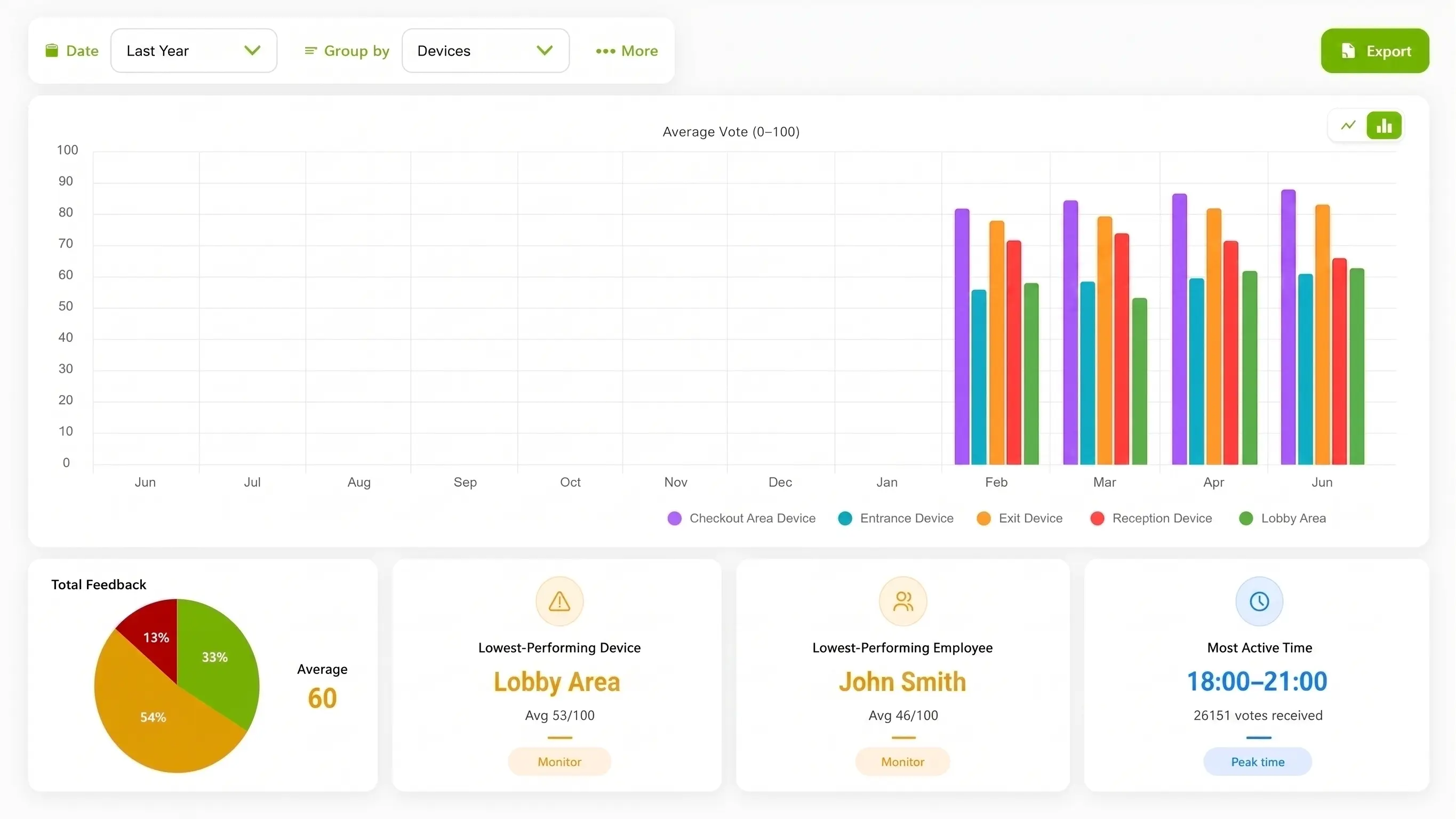
Illustration of configured review.
Choose the method for the member journey
An app can ask richer questions later. A gesture prompt is useful only when a member can pause in the club and the operator knows which service moment the point represents.
| Consideration | ThumbsUp | QR or phone survey | Shared kiosk |
|---|---|---|---|
| Customer action | Give a simple gesture at a public reception or exit point. | Open the app or phone survey and complete the chosen questions. | Use a shared screen at a reception or facilities point. |
| Setup question | Check camera view, distance, light, and pause. | Open the code and complete the form. | Reach the shared screen at the moment. |
| Manager view | Review device, location, time, and context. | Review fields from the survey workflow. | Review fields from the kiosk workflow. |
Evidence for rollout planning
An approved reception photo or clearly identified diagram can help a fitness team evaluate the public exit and locker-room boundary. A dashboard clip should show club and time labels without member identity or health information.
Practical pilot boundary
Use a short service prompt to surface a facility or visit question. It should complement app surveys and staff conversations, and it should not be described as a churn predictor, health assessment, or individual trainer score.
Read the relevant product guidanceBuying questions
The site test should cover the member journey and the club’s privacy boundary.
Questions before the pilot
Match setup to the service moment.
A gym can test a compatible camera-equipped Android tablet at a public reception, class exit, or club exit. A member gives a supported gesture after a deliberate pause, and the operator reviews the configured service context.
Authorized managers can review feedback by configured device, location, and time period. The operator should compare like service moments and use the pattern to decide what to inspect.
A short service signal should not be presented as an individual churn prediction. It can highlight a facility or service pattern for inspection alongside the club’s existing member research.
Start at a public reception or exit point with a free hand and room to pause. Keep it outside locker-room interiors and test reach, lighting, distance, and traffic.
Bring the club journey, member-experience question, and privacy boundaries. We can review a reception or exit setup and the operating checks behind it.