Review the public-facing pharmacy counter experience.
Plan touchless feedback after a pharmacy counter interaction. Review acknowledgement, clarity, accessibility, and handoff patterns without inviting clinical details.
Read the guideThumbsUp gives pharmacy teams a brief, touchless service signal at a suitable checkout or collection point. The prompt is about the experience around the visit, not prescription, medical, or clinical details.
For pharmacy chain operations, store managers, and patient-experience leads
Keep the tablet outside confidential consultation areas and test the public-facing setup with the store team before launch.
After checkout or collection
Service ends at the public counter
Step 1 for the public service point workflow
Customer gives a simple gesture
Step 2 for the public service point workflow
Team reviews store and time patterns
Step 3 for the public service point workflow
Set one short service question.
More industry guides
Compare related service moments.
Plan touchless feedback after a pharmacy counter interaction. Review acknowledgement, clarity, accessibility, and handoff patterns without inviting clinical details.
Read the guideMeasure the public prescription-pickup handoff with a brief touchless signal, then review recurring readiness, queue, and collection questions by store and time.
Read the guideSee where pharmacy waiting feels difficult by store and daypart. Use touchless service feedback to focus queue, staffing, signage, and layout checks.
Read the guideWhy pharmacy feedback needs a clear boundary
Checkout, collection, general questions, and confidential consultations do not belong in the same feedback setup. A useful pilot starts by separating the service signal from the information a customer should keep private.
Invite feedback about the service journey without asking a customer to reveal a prescription, diagnosis, medication, or other private detail.
Waiting and responsiveness can feel different during an evening collection window or a busy lunch period. Time labels give a manager a question to investigate.
Counter height, screens, signage, glare, reach, and confidential conversations all affect where a device can responsibly sit.
A pharmacy service-point sequence
A small physical prompt works only when it respects the counter layout and leaves customers a clear alternative feedback path.
Choose a checkout, collection, or exit point that does not expose prescription labels or consultation screens.
Keep the tablet visible and reachable while preserving a private space for pharmacist and customer conversations.
Invite one supported gesture after the visit. Do not request prescription details or a clinical explanation.
Authorized managers can compare configured devices and time periods, then check queue and staffing observations.
Deployment note: Never place the device where a prescription label, consultation screen, or confidential conversation is visible to the camera or another customer. Validate the alternative channel and the store’s review requirements before launch.
Placement planning
The right spot gives a customer a free hand and a deliberate pause without turning a private pharmacy exchange into a public interaction.
From service signal to store question
A score is a starting point. Pair it with observations about the service flow rather than treating it as an explanation of dispensing decisions or a patient profile.
Compare configured time periods to see whether a recurring checkout or collection window deserves attention.
Use device and location labels to compare branches or public service points on the same terms.
Check queue length, staffing, signage, and handoff observations before deciding what action to take.
Illustrative store check
If evening checkout scores dip at one location, the manager checks queue length and staffing records. The score should not be used to explain a dispensing decision or infer a patient’s circumstances.
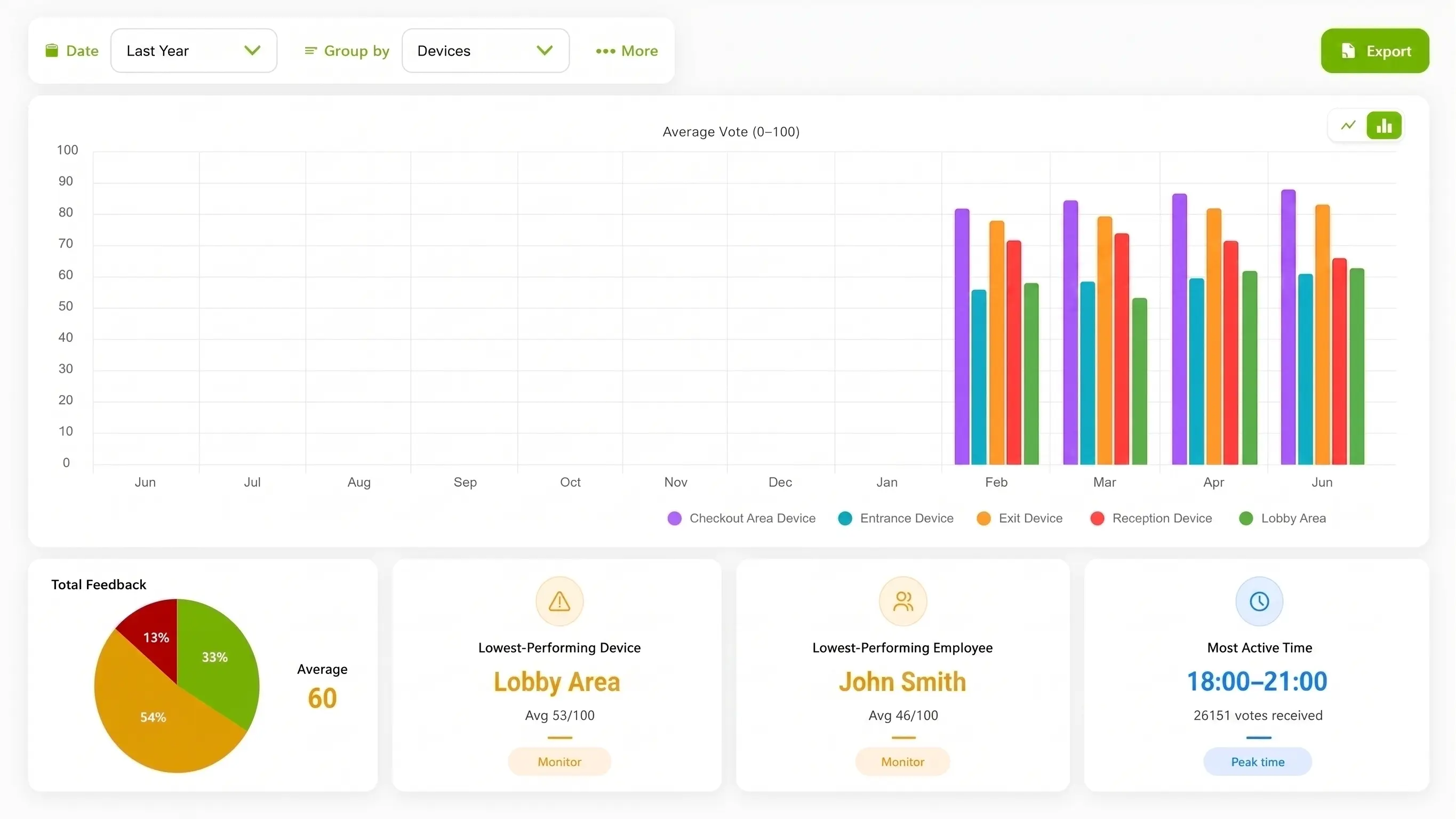
Illustration of configured review.
Choose the interaction for the moment
QR surveys and kiosks may fit other moments. The pharmacy question is whether the customer can give a voluntary signal without exposing confidential information or slowing the counter.
| Consideration | ThumbsUp | QR or phone survey | Shared kiosk |
|---|---|---|---|
| Customer action | Give a supported gesture at a public service point. | Scan a code and complete the selected phone survey. | Use a shared touch display after service. |
| Setup question | Check camera view, distance, light, and pause. | Open the code and complete the form. | Reach the shared screen at the moment. |
| Manager view | Review device, location, time, and context. | Review fields from the survey workflow. | Review fields from the kiosk workflow. |
Evidence for rollout planning
An approved counter photo or clearly identified mockup can help a pharmacy team evaluate the service point. Pair it with a captioned demonstration outside the consultation area and keep prescriptions, patients, and private screens out of view.
Scope and product review
Use a generic service prompt and ask the pharmacy, privacy, accessibility, and regulatory owners to review the intended setup. ThumbsUp does not become a pharmacy-system or clinical-data integration by implication.
Read the relevant product guidanceBuying questions
A short pilot should answer the operating questions that matter at the counter.
Questions before the pilot
Match setup to the service moment.
Place a compatible camera-equipped Android tablet at a public service point after checkout or collection. Ask for a brief service gesture and keep the prompt and review workflow separate from prescription and medical details.
It is a customer-facing tablet workflow where a person gives a supported hand gesture instead of touching a shared screen or typing into a form. The counter position, lighting, distance, and alternative channel need a site test.
It can provide a time and location signal for a manager to compare with queue, staffing, and service observations before choosing a practical improvement.
The page’s workflow should ask only about the service experience. Do not place it near confidential displays or invite prescription, diagnosis, medication, or patient-identifying details.
Bring the counter layout, privacy questions, and service moments you want to understand. We can map a public feedback point and the checks needed before launch.