Improve the grocery pickup handoff with a clear service signal
Plan touchless feedback after a supermarket click-and-collect handoff, with guidance for placement, daypart review, and order-data boundaries.
Read the guideThumbsUp gives grocery operators a short, touchless way to invite feedback after checkout, a service-desk visit, or a pickup handoff. Map each device to a defined point and compare store and time patterns without treating one score as a complete store diagnosis.
A store pilot should test occupied hands, customer flow, children or unintended gestures, staff prompting, accessible reach, and the sample context needed for a fair branch comparison.
Label one service moment
Offer a quick gesture
Confirm the response for supermarkets and grocery stores
Set one short service question.
More industry guides
Compare related service moments.
Plan touchless feedback after a supermarket click-and-collect handoff, with guidance for placement, daypart review, and order-data boundaries.
Read the guideSet up like-for-like supermarket feedback comparisons across branches, service points, and time periods with clear labels, sample context, and operational follow-up.
Read the guidePlan customer feedback at supermarket deli, bakery, meat, produce, or prepared-food counters with clear placement, service questions, and operational follow-up.
Read the guideHelp grocery operators collect a touchless signal after staffed or self-checkout and review queue-related service moments without treating it as measured wait time.
Read the guideName the service point
A single store score can hide the moment that needs attention. A pilot works better when the operator labels whether the shopper is rating checkout assistance, a service-desk interaction, or a collection handoff.
A device near a completed checkout can capture a short service signal while keeping the lane clear. Do not imply a POS or basket link unless one is approved and implemented.
Customer questions, returns, and grocery collection have their own context. Give each configured device a clear label so managers know what it represents.
Compare like time blocks and include sample counts. A low period points to investigation; it does not automatically identify a stockout, queue cause, or staff fault.
A store-ready interaction
Shoppers may be carrying bags, pushing a trolley, helping children, or moving toward an exit. Use a visible, optional point after the service moment and keep receipt or QR surveys available for detail.
Place the compatible tablet after checkout, assistance, or collection where it will not obstruct queues or staff.
A shopper gives a supported hand gesture without scanning a receipt, typing, or touching a shared screen.
For supermarkets and grocery stores, the confirmation display is configured to show for 1 second by default, according to current product documentation.
Authorized managers review configured device and time context, then check the store observations behind a pattern.
Touchpoint map
The same device cannot explain every part of a grocery visit. Choose the smallest useful set of points, then keep labels and comparison windows consistent across branches.
Do not infer shopping behavior, stock availability, basket value, or POS outcomes from a generic score. Use store records and direct observation to investigate what the pattern may mean.
Ask about the completed checkout experience after the shopper has left the lane. Keep the device out of the cashier’s working space.
Use a visible point after assistance, with enough space for an optional gesture and no assumption that the vote is tied to a transaction.
A desk device can focus on help or returns. Define whether the rating is about wait, explanation, resolution, or the overall desk interaction.
Treat a pickup handoff as its own service moment. Do not imply that the rating is linked to basket contents or a specific order.
Turn a score into a question
Authorized managers can review configured devices, locations, and time periods. Add the sample context and store observations needed to decide whether a branch, shift, or service point needs attention.
Hypothetical store example
Self-checkout-area scores are lower during an evening block. The store manager reviews assistance coverage and queue observations for that period. The example does not claim a POS, basket, stock, or customer-identity connection.
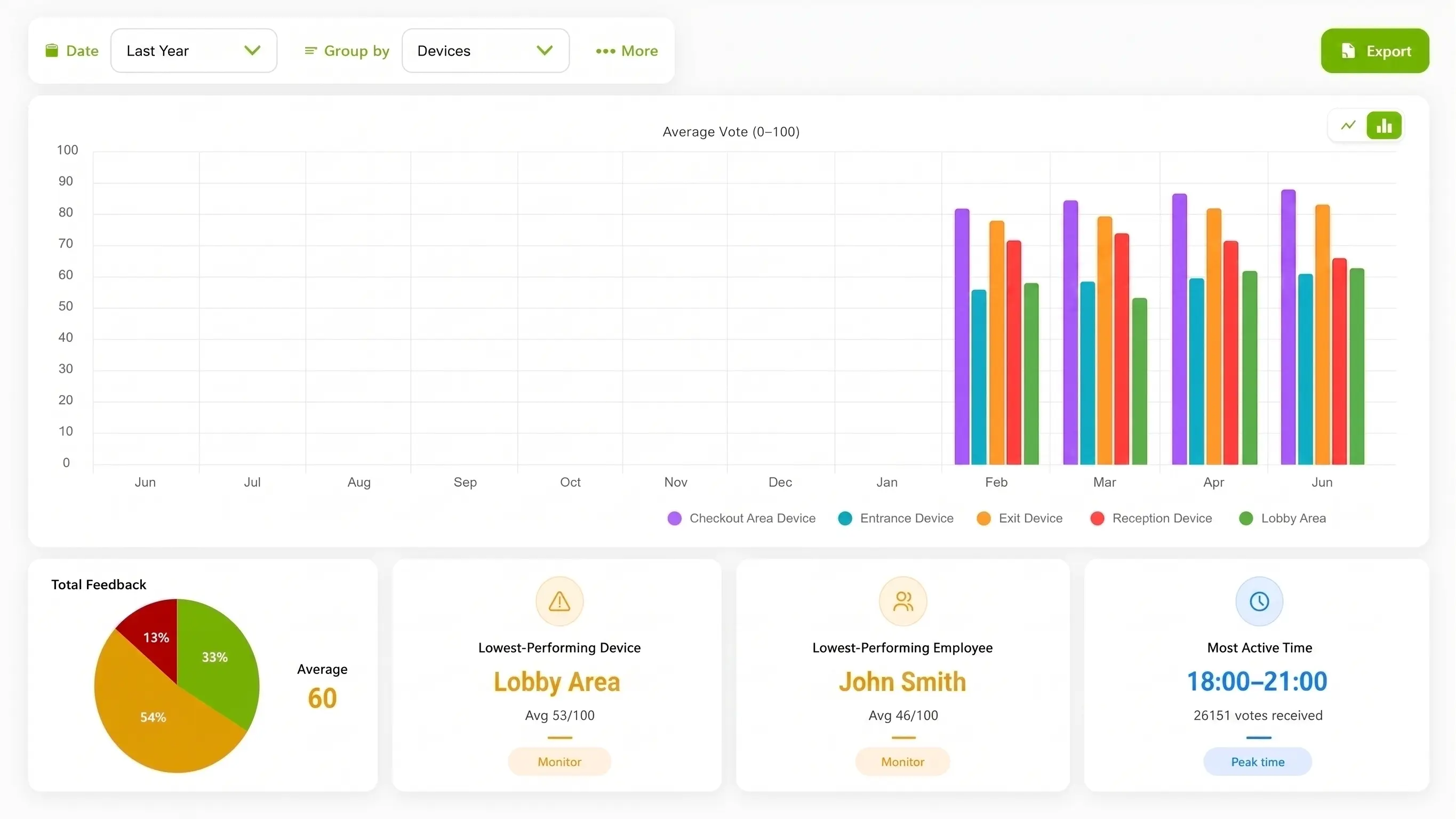
Compare configured store devices and time trends. The example image is product interface imagery, not a supermarket result or retail integration.
Feedback methods
A short on-site pulse and a longer survey answer different questions. Decide whether the store needs a quick directional signal, detailed comments, or both.
| Consideration | ThumbsUp | QR or SMS survey | Existing service process |
|---|---|---|---|
| Customer action | Give a supported gesture at a labeled service point | Scan a receipt or open a message and complete a form | Continue through an existing service or complaint route |
| Best fit | A quick post-checkout or post-assistance signal | Detailed comments, follow-up, or survey fields | Immediate staff help or a formal issue record |
| Operational view | Configured device, store, and time context | Whatever store, receipt, or survey fields are collected | The records already created by the store process |
| Important boundary | No automatic POS, basket, stock, or footfall denominator | Can be harder to complete at a busy physical point | May not create comparable feedback across every branch |
Store pilot checklist
A useful rollout plan names the service point, the comparison window, and the evidence a manager will use alongside the feedback. Do this before discussing a chain-wide device count or pricing.
Choose a post-task position that does not obstruct checkout, pickup, or accessible routes.
Test free-hand reach, camera angle, customer flow, and unintended gesture risk.
Label devices by branch and service point, then define comparable time blocks.
Record sample counts and the store observations that will accompany a low score.
Product and privacy boundary
For supermarkets and grocery stores, current ThumbsUp documentation says the selfie camera supplies live input for hand-gesture recognition, does not collect biometric data, and that ordinary feedback records do not contain a camera image or video. Review the current Privacy Policy, retention behavior, accessibility needs, and store security requirements before deployment.
Read the Privacy PolicyOperational questions for supermarkets and grocery stores
Match setup to the service moment.
A supermarket can test a compatible camera-equipped Android tablet after checkout or assistance, at a visible point that does not interrupt the lane. A shopper gives a supported hand gesture, and authorized managers review the configured device and time context.
They can compare feedback from configured devices, locations, and time periods when the service points and comparison windows are labeled consistently. Managers should include sample context and investigate the operating conditions behind a difference.
A gesture tablet can offer a short on-site signal after a defined service moment without requiring a phone or receipt scan. Receipt and QR surveys remain useful when the operator needs open text or detailed follow-up.
A score can show a time or service-point pattern worth reviewing. Store teams can compare it with queue, staffing, stock, and direct observation records, then choose a focused improvement and review the same service point again.
More supermarkets and grocery stores service moments
Bring a store floor plan, the service point you want to measure, and the comparison questions your operations team asks. We can review a small, clearly labeled checkout or service-desk test.
Talk through the store pilot