Collect forecourt feedback after the service is complete
Collect safe, post-service feedback about a fuel-station forecourt and route site patterns to the right operational review with ThumbsUp.
Read the guideThumbsUp gives fuel and convenience operators a touchless way to invite feedback at a safe post-service point. Separate fueling, checkout, food, restroom, and car-wash moments, then compare configured location and time patterns.
The tablet is not used while a customer is actively fueling or driving. Test a permitted stationary position, outdoor exposure, reach, crowd flow, and the site’s fuel-safety requirements.
Choose a safe post-service point
Invite a brief gesture
Confirm the response for fuel and convenience stores
Set one short service question.
More industry guides
Compare related service moments.
Collect safe, post-service feedback about a fuel-station forecourt and route site patterns to the right operational review with ThumbsUp.
Read the guideCapture location-specific restroom experience signals at fuel stations so teams can review cleanliness and supplies while the visit is still fresh.
Read the guideUnderstand the handoff from fueling to the convenience shop with a post-service feedback point for checkout, food, and store-exit experience.
Read the guideCompare like-for-like customer experience signals across fuel-station locations and shifts with clear device labels and manager review.
Read the guideSeparate the forecourt moments
A convenience visit crosses a forecourt and a store. A useful signal names the moment after it is complete and keeps active fueling and driving outside the tested interaction.
Use a stationary, permitted point after the customer has finished fueling. Do not ask for a gesture at the pump or while a vehicle is moving.
Checkout, food counter, and restroom access can have separate owners and expectations. Label the device with the service point it represents.
Compare like locations and periods. A low score starts a site check; it does not diagnose a pump, product, staffing, or supply problem.
A safe store interaction
The most useful place is often inside the store or at a clearly permitted exit after service. Keep receipt surveys, mystery shopping, and complaint channels available for detail and independent checks.
Place a compatible camera-equipped tablet inside the store or at a permitted exit point after the customer has stopped fueling and moved safely.
A customer gives a supported hand gesture without scanning a receipt, typing, or touching a shared screen.
For fuel and convenience stores, the confirmation display is configured to show for 1 second by default, according to current product documentation.
Authorized managers review configured device, location, and time context and pair a pattern with operational records.
Forecourt-to-store map
Map every device to a store or forecourt moment. Make the no-fueling zone obvious in the pilot plan and document how customers reach the tablet with a free hand.
Outdoor placement needs a specific review for glare, weather, mounting, vandalism, fuel-safety rules, accessible reach, and high-throughput flow. The intended interaction begins only after active fueling and driving are complete.
A stationary indoor point can focus on checkout or the broader store visit and is easier to protect from weather and glare.
Use a post-handoff point if the operator wants to learn about prepared food service. Keep the device clear of queue flow and spills.
Place the device outside private areas and label the signal. Supply and cleaning checks remain separate operational evidence.
Use only where the customer has stopped safely after the task and site rules allow the installation. Never suggest a gesture while fueling or driving.
Investigate the shift
A configured device and time signal can help a regional or site manager choose where to inspect. Use staffing, supplies, queue observations, equipment notes, and customer comments to understand the pattern.
Hypothetical convenience-store example
Evening scores near one restroom and checkout exit are lower. The manager checks staffing, supplies, and queue observations for that time block. The example does not claim a pump diagnosis, fuel transaction link, or automatic shift finding.
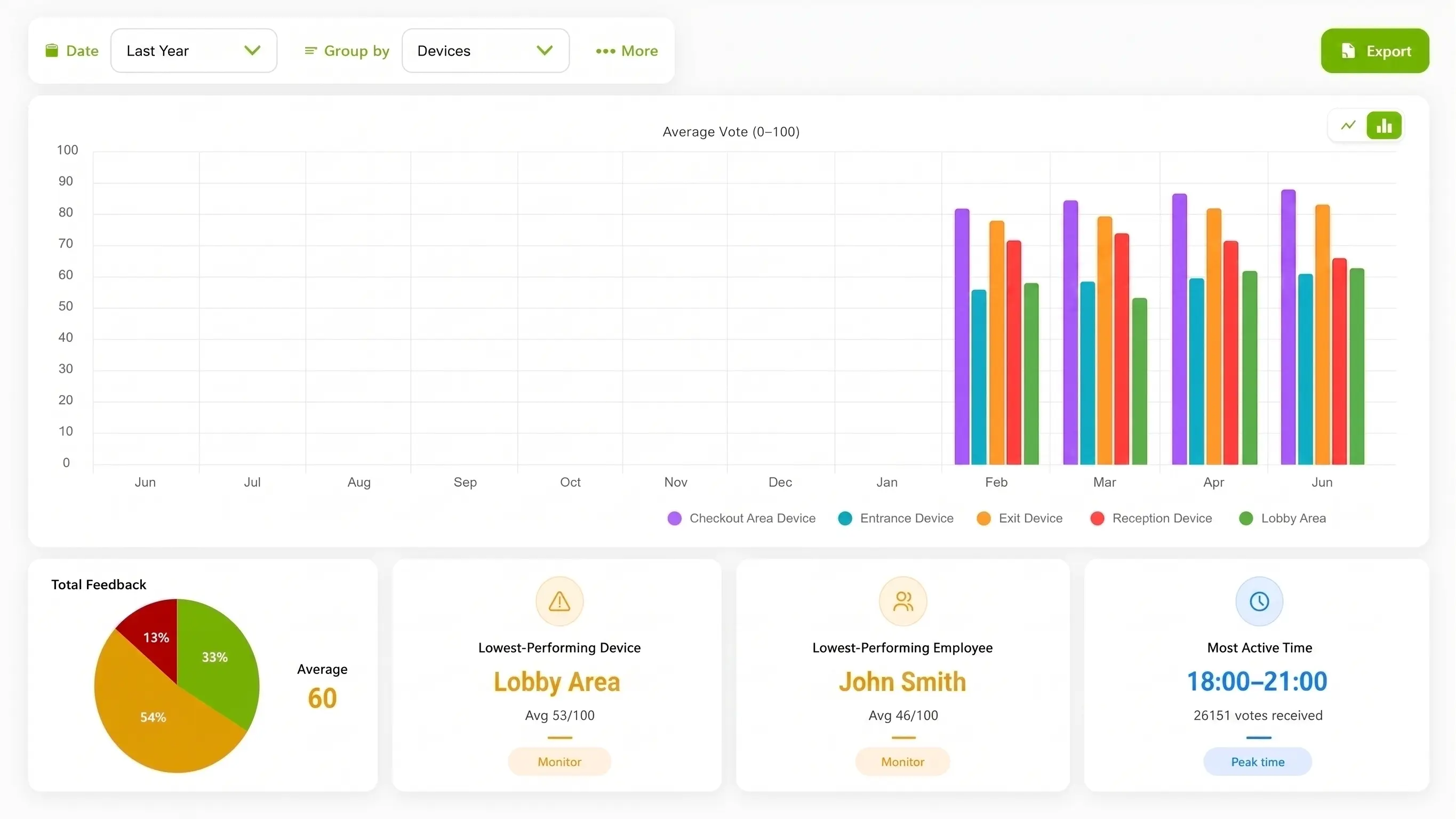
Use the dashboard to compare configured store feedback devices and time trends. The product interface image is illustrative and does not show a forecourt integration or customer result.
Use each channel for its job
The store needs a safe, short signal and may also need detailed comments, compliance checks, or an immediate complaint route. Make the responsibilities visible to operators and customers.
| Consideration | ThumbsUp | QR or SMS survey | Existing service process |
|---|---|---|---|
| Customer action | Give a supported gesture at a permitted stationary point | Scan a receipt or open a phone survey | Use mystery shopping, complaint, or staff service records |
| Best fit | A quick post-service signal by store, device, and time | Detailed comments or follow-up after the visit | Structured checks or an issue needing direct resolution |
| Operational view | Configured site and time context | The fields captured by the survey or receipt flow | The observations and records produced by each process |
| Important boundary | No active-fueling interaction, pump diagnosis, or automatic cause | Requires phone attention and a completed form | May not provide a comparable pulse at every service point |
Convenience-store pilot
Start with one site and one post-service question. Confirm ownership, permitted mounting, accessible reach, cleaning, and the evidence that will be reviewed with a low score.
Mark a no-fueling, no-driving interaction point and confirm the site’s safety rules.
Test indoor or outdoor glare, weather, mounting, cleaning, reach, and vandalism exposure.
Label devices by store, service moment, and comparable shift or time window.
Define how supplies, queues, staffing, complaints, and mystery-shopping records join the review.
Product and privacy boundary
For fuel and convenience stores, current ThumbsUp documentation says the selfie camera supplies live input for hand-gesture recognition, does not collect biometric data, and that ordinary feedback records do not contain a camera image or video. Review the current Privacy Policy, retention behavior, fuel-safety rules, accessibility needs, and site security requirements before deployment.
Read the Privacy PolicyOperational questions for fuel and convenience stores
Match setup to the service moment.
A gas station can test a compatible camera-equipped Android tablet at a safe, stationary point inside the store or after a permitted post-service exit. A customer gives a supported gesture after active fueling and driving are complete, and managers review the configured site and time context.
Use a visible, accessible point after the relevant task, such as a shop exit, checkout area, food handoff, or permitted forecourt exit. Do not place the intended interaction at an active pump or in a moving traffic path.
A configured device and time pattern can help a manager choose a shift or site for investigation. Staffing, queue, equipment, supply, and customer records are needed to assess the possible cause.
The intended interaction should not occur while a customer is actively fueling or driving. Test and communicate a safe post-service point where the vehicle and customer are stationary and site rules permit the setup.
More fuel and convenience stores service moments
Bring your forecourt-to-store map, fuel-safety rules, and the service moment you want to compare. We can review a permitted post-service point and the evidence needed for rollout.
Talk through the store setup